
我们用最简单的方式来体会Openwrt Web主题修改的方式。
1、删除默认主题限制条件
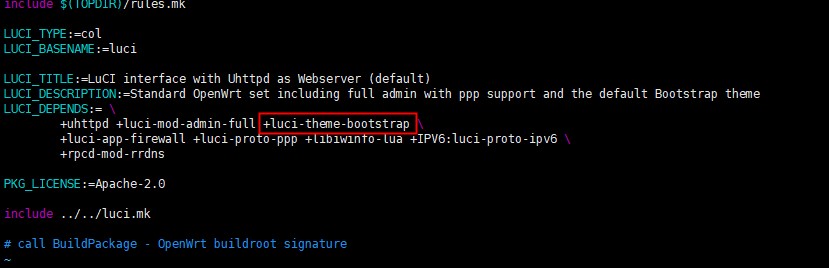
打开修改文件 vim openwrt/feeds/luci/collections/luci/Makefile
删除图片中红色标注的默认主题,并保存。
2、选择需要主题
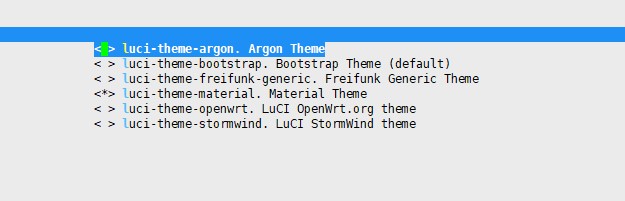
输入 make menuconfig
这时候你会看到所有主题都可以自由选择
3、保存编译
编译生成一个测试下吧,意想不到的惊喜。
我们用最简单的方式来体会Openwrt Web主题修改的方式。
1、删除默认主题限制条件
打开修改文件 vim openwrt/feeds/luci/collections/luci/Makefile
删除图片中红色标注的默认主题,并保存。
2、选择需要主题
输入 make menuconfig
这时候你会看到所有主题都可以自由选择
3、保存编译
编译生成一个测试下吧,意想不到的惊喜。
在大家安装开发环境的时候离线安装包有时候确实很重要,比如说你有多台电脑需要安装VS2019或者有别的朋友、同事、同学等也行安装VS2019,那不能一起在线安装吧,不光是占用了大量带宽,而且效率很低。那离线安装包就显得比较有优势了。那我们到底如何获取离线安装包呢,请看下面几步:
1、获取微软visualstudio2019下载软件
2、打开电脑的CMD窗口,输入以下命令
vs_community.exe --layout c:\vslayout --lang zh-CN根据自己的情况,下载目录可以随便修改。
3、已打包好链接
链接:https://pan.baidu.com/s/1iNSf_YY3z2TvDgGBXkKFEA 提取码:hvra
链接:https://share.weiyun.com/5VjmyPm 密码:ina7ge
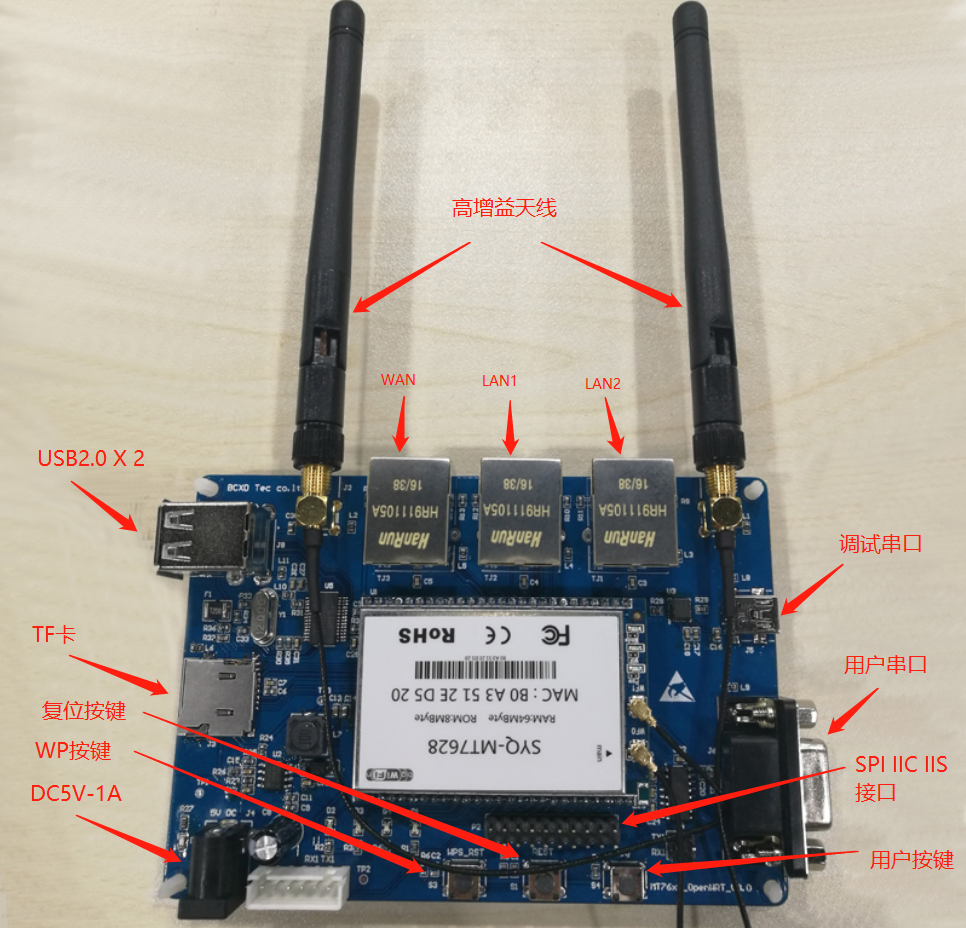
MT7628开发板采用元电荷核心板SYQ-MT7628作为板卡主控,RAM为64MByte,ROM为8MByte,底板预留丰富接口与调试口,并设计板载双天线增强信号质量,为开发者和学习者提供便利。
MT7628开发板支持Linux和OpenWrt操作系统及自定义开发,是一体化的802.11b/g/n WIFI解决方案,可以广泛地适用于智能设备和与服务应用等开发,包括数据透传DTU、4G路由器、无线摄像头、无线传呼机、硬AP、无线中继器、路由器、智能音箱、远程NAS等等应用开发。
物联网应用
WIFI 智能家居
WIFI 安防监控
工业控制
消费类电子
有线转无线
4G 转 WIFI 共享
无线摄像头
硬 AP
路由器
无线音箱
无线存储
WIFI 移动电源
便携式移动 WIFI 热点
 (1)板子高增益双天线。
 (2)DC5V供电,适合多种电源适配器。
 (3)板载TF卡,可扩大存储空间。
 (4)板载 480Mbps 高速 双USB接口,增大接口应用。
 (5)有线+无线路由器方案。
 (6)支持 802.11 b/g/n 协议,最高 300/150Mbps。
 (7)有线支持 1WAN 或 2LAN,10M/100M 自适应。
 (8)适中的 RF 功率消耗。
 (9)板载 64MB DDR2 内存,8MB FLash。
 (10) 3 路 UART(推荐 UART0 专用于系统 Debug)。
 (11) TCP 转串口。
 (12) SD-XC、eMMC、PCM、IIS 数字音频接口(192K/24bits)、IIC 通讯接
 口、PWM、SPI master/slave。
 (13)丰富的 GPIO。
更多的资料请加QQ群:欢迎加入wifi模块资料分享openwrt,群聊号码:145681792
对于Linux系统添加自启动供能,想必大家都是耳熟能详,一般是把需要启动的脚本或者程序添加到 /etc/rc.d/rc.local 文件里就好了,但是在这里你错了,openwrt并不是这么实现的。而是通过另外一种方式,采用存放在/etc/init.d目录下的脚本连接到/etc/rc.d目录下,并且这个脚本需要遵循一定的规则。举例如下:
1、vi /etc/init.d/mystart
2、输入以下内容
#!/bin/sh /etc/rc.common
# Example script

START=10
STOP=15

start() {
        echo start
        # commands to launch application
}

stop() {
        echo stop
        # commands to kill application
}
3、 然后保存,退出
4、获取执行权限及映射
cd /etc
chmod -R 777 init.d/mystart #设置权限,否则无法激活开机启动,提示权限不足
/etc/init.d/mystart enable #激活开机启动
/etc/init.d/mystart start #运行start函数启动程序
5、脚本说明
第一行#! 使用 /bin/sh /etc/rc.common 作为脚本解释器并在执行脚本前调用 main 和检查脚本。
公用的 init script 方法:
         start   # 启动服务
         stop    # 停止服务
         restart # 重启服务
         reload  # 重新载入配置文件, 如果失败则重启
         enable  # 启用开机自启动
         disable  # 禁用开机自启动
 脚本中 start() 和 stop() 是必须的
 START= 和 STOP= 决定脚本启动时的次序. 启动时init.d会根据文件名顺序, 自动执行在/etc/rc.d中找到的脚本. 初始化脚本可以作为/etc/init.d/下文件的软链放置在/etc/rc.d/. enable 和 disable 可以自动帮你创建对应的带序号的软链.
import os
import tkinter as tk
from tkinter import *

master = tk.Tk()
entry1_str = tk.StringVar()

def helloCallBack():
    entry1_str.set("好的回购好的回购好的回购好的回购好的回购好的回购")
    print("hello word")

def gui():
    master.title("Lable家族")
    master.geometry("800x480")
    master.update()

    theLableFrame = tk.LabelFrame(master,text="文件列表",padx=5, pady=5,bd=5)
    theLableFrame.pack(fill=BOTH, expand=YES, padx=10, pady=10)

    theLable = tk.Label(theLableFrame,width = master.winfo_width(),wraplength = 80,anchor=NW,textvariable=entry1_str)
    theLable.pack(fill=BOTH, expand=YES, padx=10, pady=10)

    theButton = tk.Button(master, text ="点我", command = helloCallBack)
    theButton.pack(side='bottom')

    master.mainloop()


if __name__ == '__main__':
    gui()
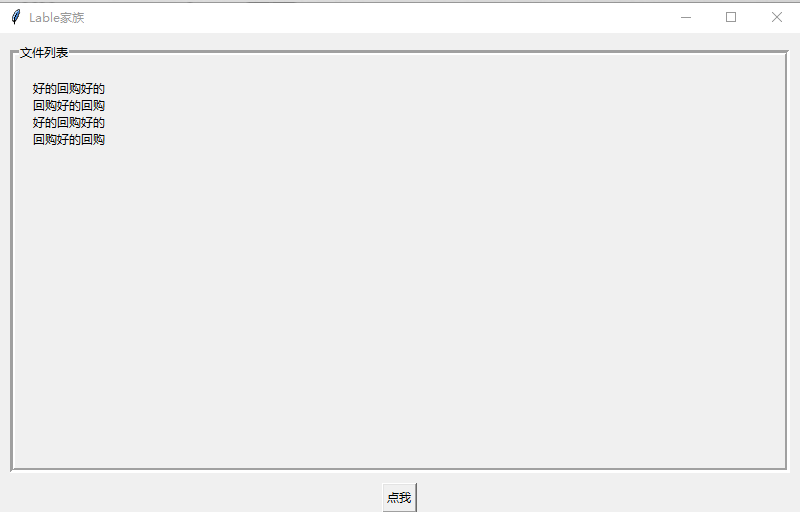
实现效果图如下:
一、4G模块驱动移植
1、进入openwrt程序目录下,输入make menuconfig,一次选择如下:
LuCI模块:
LuCI -->
    5.Protocols -->
        <*> luci-proto-3g
        <*> luci-proto-ppp
内核USB驱动:
Kernel modules  -->
    USB Support  -->
        <*> kmod-usb-acm
        <*> kmod-usb-core
        <*> kmod-usb-net
        <*> kmod-usb-ohci
        <*> kmod-usb-serial
        <*> kmod-usb-serial-option
        <*> kmod-usb-uhci
        <*> kmod-usb2
驱动USB网卡工具:
Utilities -->
    <*> usb-modeswitch-official
    <*> usbutils
2、编译固件,make V=99
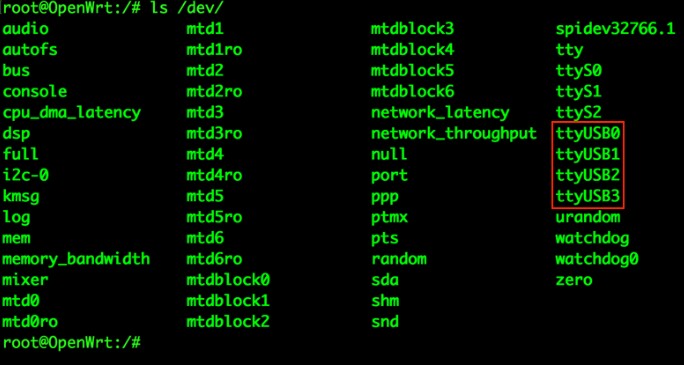
3、将固件升级到板卡后,进入控制台,输入ls /dev,显示如图:
4、修改network配置文件,输入vim /etc/config/netwotk,修改wan6部分,如图:
config interface 'wan6'
    option ifname '3g-wan6'
    option proto '3g'
    option device '/dev/ttyUSB0'
    option dialnumber '*99#'
    option apn '3gnet'
    option username 'card'
    option password 'card'
    option service 'umts'
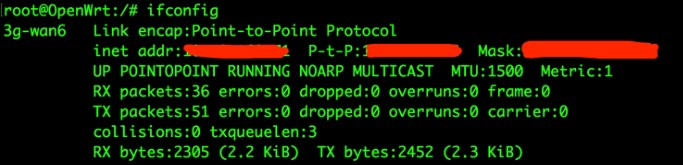
5、保存,复位设备。在控制台输入ifconfig ,显示如图:
1、找到虚拟机所在的目录将 .vmx文件打开将文件vmci0.present = "TRUE"改为vmci0.present = "FALSE" ;

2、删除以.lck为后缀名的文件;

3、重新打开虚拟机
 查看哪些版本可以安装:
sudo apt-cache search aarch64

 安装一个gcc开头的5版本的支持64bit ARM linux的交叉编译工具:
sudo apt-get install gcc-5-aarch64-linux-gnu

 然后再安装一个没有版本号的gcc-aarch64-linux-gnu:
sudo apt-get install gcc-aarch64-linux-gnu

以上步骤是安装支持ARM64位系统的交叉编译工具,安装之后,用aarch64-linux-gnu-gcc -v可以查看里边的版本信息,里边有host是什么,target是什么。
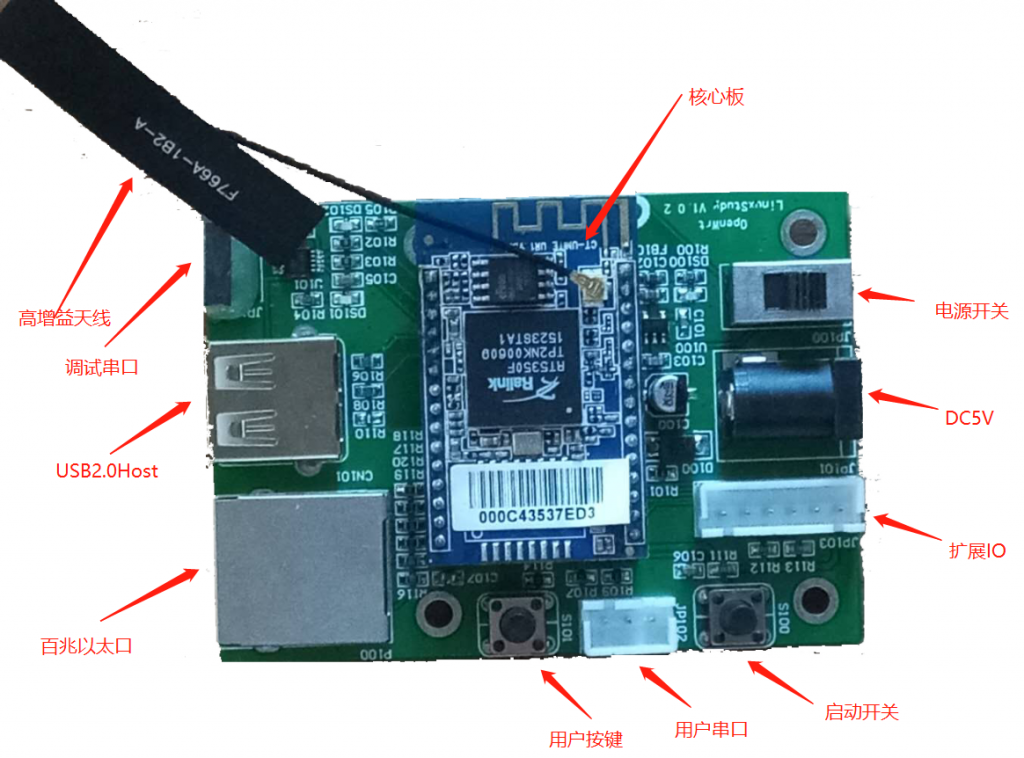
一、开发板简介
开发板采用古老的RT5350路由级SOC作为主芯片,意在打造一款性价比极高的WiFi开发板,Openwrt学习板。为啥用古老的芯片呢?为啥不用当前流行的MT7688、MT7628呢?在路由器的历史舞台上有过这么样的芯片,它叫RT5350f,应用在多家厂家的路由器上,包括TP-link、Tenda、D-link等等,历经尽7年之久才退役,它的稳定性是经得住考验的,它的开发资料是多之又多,关于它的开发问题,百度都能找到。同学们啊,咱们是来干嘛的,学习啊。学习最缺少的是啥???前辈的经验分享啊,在这品牌泛滥的时代,系统性的资料更让人珍惜。
那为啥说他相加比极高呢,他能跑Linux啊,他的主频350MHz啊。但他的价格跟ESP8266一个价格,有人说他早就停产了,确实停产了,但你忽略了中国人的智慧,他们无声无息的做了大量库存。他们早就知道物联网时代需要的是什么,只是为了更好地学习。
那有人问了, 学习 这么个古老的东西会不会落后啊,那我可以很高兴地告诉你知识啥时候都不会落后,Linux都经历了多少世纪,学会了这个开发板,MT7688、MT7628,甚至高通的芯片开发板,都不在话下,顶大多看几个不同CPU的datasheet,但你的思路一直很清晰,知道如何自己面对一款新CPU需要什么,如何去做。
二、资源介绍:
1、WiFi IEEE802.11 b/g/n
2、I2S音频接口
3、I2C总线接口
4、USB主口
5、百兆以太口网口
6、两个普通IO口
三、应用方向:
路由器、机器人、WiFi模组、语音识别、音响……
四、开发资料
1、开发板原理图、PCB图。
2、入门教程。
五、实验课程
1、mqtt 服务。
2、远程摄像头。
3、WiFi音响。
一、如何配置编译下载openwrt
二、如何搭建openwrt编译开发Ubuntu环境